




Agents: Your questions answered
PROPERTY SEARCH FUNCTIONALITY:
How do property seekers find my listings - when they search
by price?
When will property seekers be shown my listings in the
showcase carousel?
How do people find my contact details when they are searching
for an agent?
How do Lifestyle listings display on realestate.co.nz?
How does the agent search function on our website?
LISTING DETAILS:
Can I edit or change the estimated sale price for a listing
or all listings from our office?
Can I remove the CV for a listing or all listings from our office?
Can I remove the price change history on my listing?
Can I re-set the publish date on a listing to move it higher
on the page?
LISTING PERFORMANCE REPORTING:
What information will be in the Listing Performance
Report?
When will I receive the first Listing Performance Report on a
new listing?
How often do the numbers on the Listing Performance Report
get updated?
How are total enquiries measured within realestate.co.nz?
What do impressions and clicks under digital performance
mean?
On the Listing Performance Report, what do Search View and
Listing View mean?
How many properties are included in a 'saved search' email to
property seekers?
MARKETING YOUR PROPERTY:
What is the difference between a Feature and a Premium
Feature?
How does a refresh work?
When would my branding be included in a saved search
email?
How do I exclude a listing from a Club package?
AGENT SUPPORT:
How do I raise a support ticket online?
PROPERTY SEARCH FUNCTIONALITY:
How do property seekers find my listings - when they search by price?
All listings have a single search price. To help people find properties that match their search criteria, they can search based on a minimum and maximum price. If your listing’s search price is $650,000, it will appear in all searches that contain a search price, such as $600,00 to $700,000 or $550,000 to $650,000, etc.
Listings that fall within the user's search range will be presented to them (as long as they also match other search criteria, such as location or number of bedrooms). See chart below.
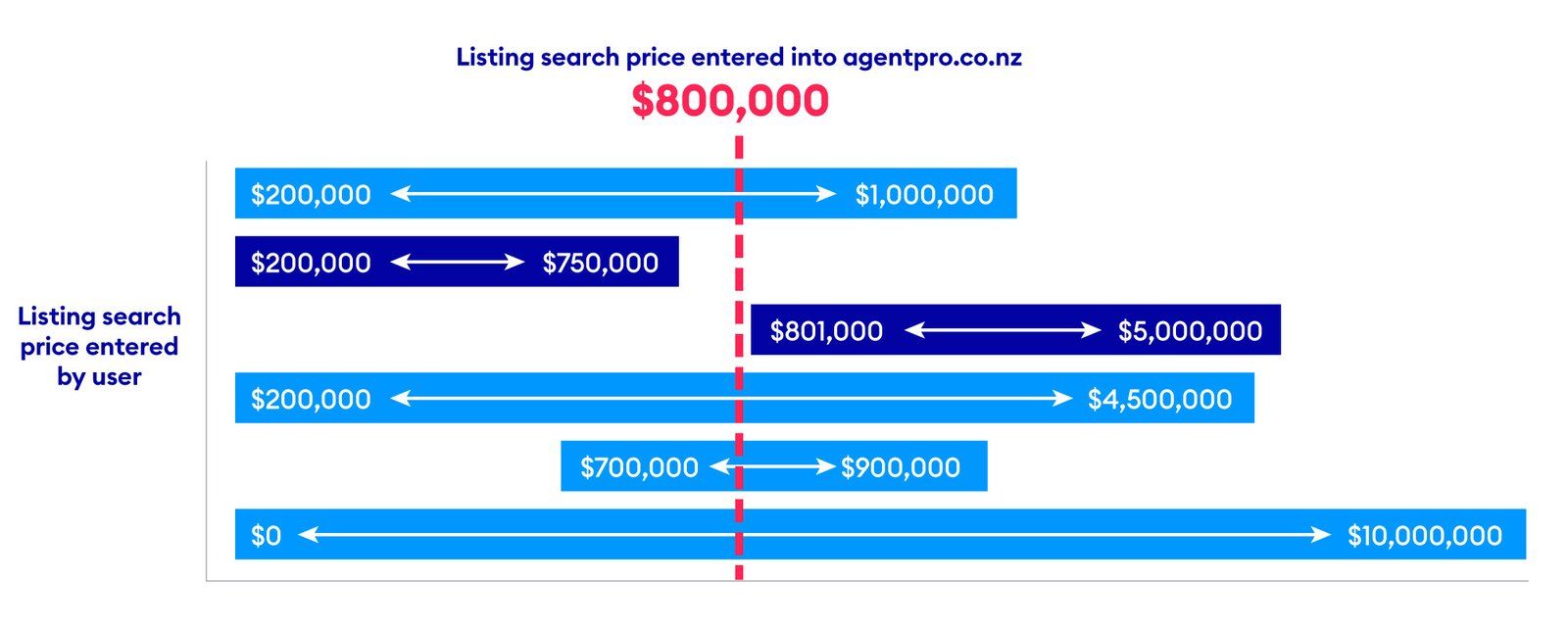
Note: If you enter your listing directly into Agent Pro, you will enter the search price. If your listing is provided to us by your data provider or CRM, your system will provide the single search price. Please contact your data provider for information on how they establish this value.
When will property seekers be shown my listings in the showcase carousel?
The showcase carousel is designed to show your listing to the most relevant buyers. We ensure that your listing is presented to property seekers who are looking for properties like yours. We will also show your listing to people who may not have already considered it but have similar search criteria in terms of location and price.
Listings are presented based on the following display criteria.
- Display criteria 1 - Price + Suburb
-
Display criteria 2 - Price + Surrounding Suburb
-
Display criteria 3 - Different Price + Suburb
- Display criteria 4 - Different Price + Surrounding Suburb
How do people find my contact details when they are searching for an agent?
Under the Agents tab in the menu bar, property seekers can find agents by name; or offices by name or suburb.
How do Lifestyle listings display on realestate.co.nz?
Property seekers can search for ‘lifestyle properties’ or ‘lifestyle sections’ as a property type in both the Rural and Residential categories on the realestate.co.nz site.
When entering the listing details in your CRM, you may be able to manually select if the listing is a rural lifestyle listing or a residential lifestyle listing, or you may just select 'lifestyle', and your CRM provider will make that decision on your behalf. In both situations where the listing is displayed on site is the same. It will appear in both the Rural and Residential sections.
Because of this, Lifestyle listings must be advertised with residential upgrade packages.
How does the agent search function on our website?
The agent search is primarily a name search - which is why there is a drop-down when you search; however, should you enter a location or keyword, multiple factors are taken into account, with priority given to number of listings.
LISTING DETAILS:
Can I edit or change the estimated sale price for a listing or all listings from our office?
This information is one of the key reasons property seekers continue to use realestate.co.nz. Providing this information keeps visitors to our site engaged and encourages them to return to look for property. As it is an automatic estimation, we cannot edit it. However, if for any reason you believe the data displayed is incorrect, you can contact our support team.
Can I remove the CV for a listing or all listings from our office?
The CV cannot be removed. A property CV is public information that’s available from a variety of sources. Buyers typically use this as part of the sales process to make a more informed decision. We have partnered with our trusted industry partner, REINZ, to ensure our data is as accurate as possible. If for any reason the data displayed is incorrect you can contact our support team.
Can I remove the price change history on my listing?
The price change history can only be removed in the event of an administrative error. Property seekers on realestate.co.nz are looking for comprehensive pricing information. The price change history provides users with pricing transparency. It collates the same information that property seekers will receive in email and push notifications on price updates.
Can I re-set the publish date on a listing to move it higher on the page?
No, we don’t allow re-listing on our site under 30 days for the following reasons:
- As per our subscriber agreement, it is against our T&Cs to republish to get higher up on the search page - See SCHEDULE 3: TERMS OF USE OF SERVICES. However, you can book a premium package to increase visibility. See more on Listing Refresh below.
- Impact on property seekers – Republishing a listing as ‘new’ is misleading to property seekers. It also removes the listing from their saved properties, so they will no longer be updated about the property.
- Loss of data – Agents and agencies lose the metrics associated with property listing when it is republished.
-
Loss of advertising - Agents and agencies
lose any existing advertising applied to the listing
- Data integrity - Republishing inflates new listings and stock numbers, which impacts the accuracy of our reporting.
LISTING PERFORMANCE REPORTING
What information will be in the Listing Performance Report?
The report will be broken into three sections:
- At-a-glance view
- In-depth view
- View users by location
This data is collated using internal metrics. You’ll be able to see views, enquiries and calls, amongst other engagements, as well as how many users have added a property to their open home calendar and saved it. We also include where the interest is coming from by region and city. Other information in the report includes the latest package booked for the property listing, when it’s ending and the correlation between the package booked and the total number of views.
When will I receive the first Listing Performance Report on a new listing?
Listing Performance Reports are sent out after the first full week of marketing but you can access your reports at any time in Agent Pro.
If you have not altered your settings, you will receive the Listing Performance Report every week on the same day the listing was published.
For example, if your listing is published on a Tuesday and your default report day is set to Monday, the first vendor report will not be sent on the first Monday (i.e. the sixth day). It will be sent on the following Monday.
You can change the day you wish to receive your listing performance reports via Agent Pro.
Access your Agent Pro dashboard
How often do the numbers on the Listing Performance Report get updated?
The numbers on the Listing Performance Report are updated overnight and will be displayed by 9am the next day.
How are total enquiries measured within realestate.co.nz?
Total enquiries include all emails and click-to-contact.
Email enquiries are the number of emails sent within realestate.co.nz.
The ‘click to contact’ metric is the number of times users have clicked on the 'call' button on a listing to initiate a call to the agent. While the "click to contact" metric can indicate potential calls made to an agent, it does not track actual calls as this information is controlled by individual phone carriers.
What do impressions and clicks mean on digital product performance?
- Impressions: The number of times your listing ad was seen by your target audience on social platforms such as Google, Facebook and Instagram.
- Clicks: The number of times a person (from your ad’s target audience) clicked on your social ad.
On the Listing Performance Report, what do Search View and Listing View mean?
Listing Views are the number of times the listing details page has been viewed or the listing has been interacted with on the search results page.
Search views are the number of times a property has appeared on a property seeker’s screen across the various pages of realestate.co.nz.
How many properties are included in a ‘saved search’ email to property seekers?
The saved search email includes properties that match a user’s search criteria. It includes up to 10 new properties and 5 featured properties.
MARKETING YOUR PROPERTY
What is the difference between a Feature and a Premium Feature?
When you upgrade your listings, the package selected will contain either a Feature or a Premium Feature.
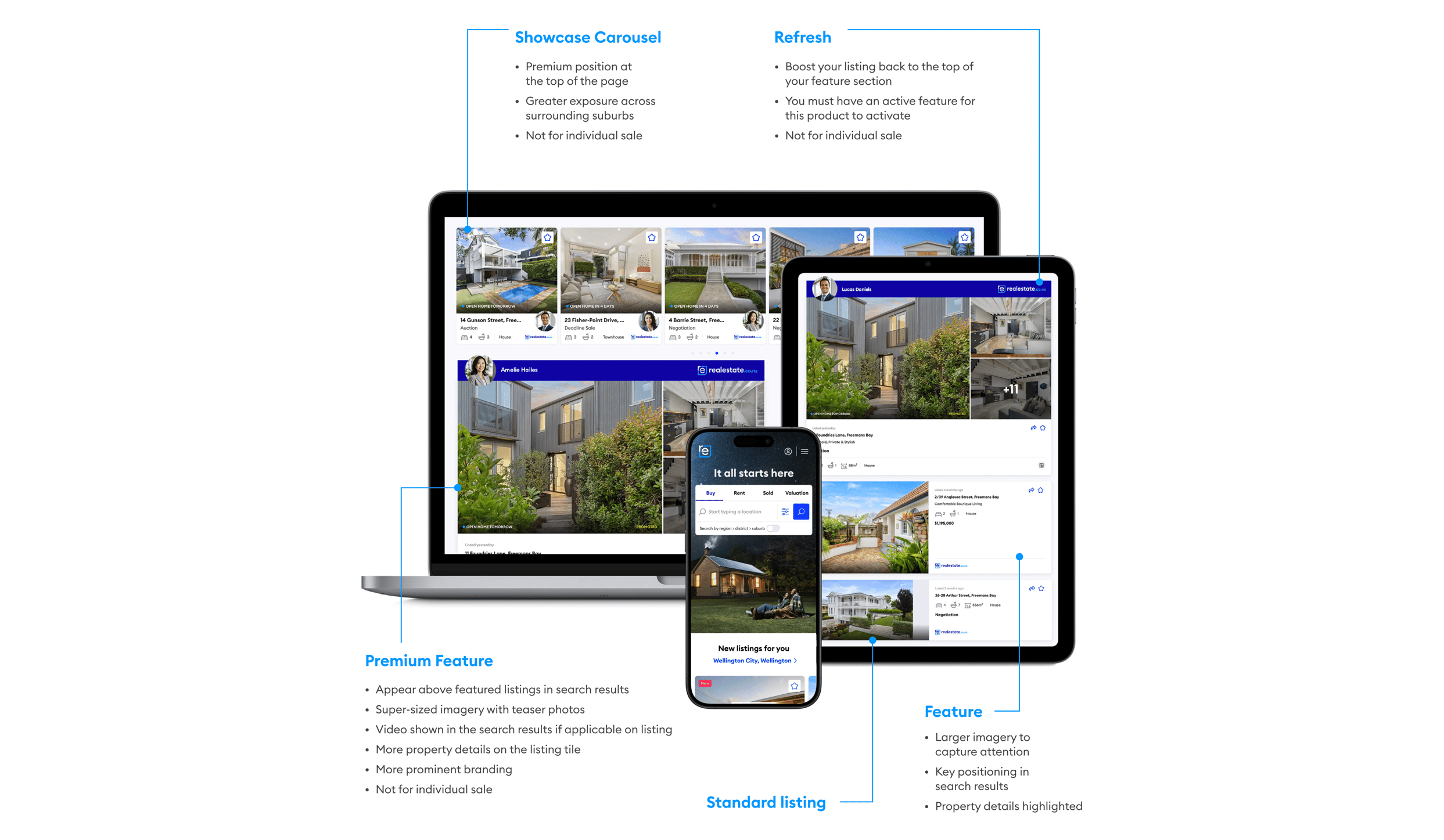
A Premium Feature
- Appear above the featured listings in search results
- Super-sized imagery with teaser photos
- Video is shown in the search results, if applicable on the listing
- More property details on the listing tile
- More prominent branding.
A Feature:
- Larger imagery to capture attention
- Key positioning in search results
- The property details are highlighted.
Premium features are included in Platinum, gold and silver packages. A feature is included in the Bronze package.
How does a refresh work?
Listing refreshes are part of all marketing packages on realestate.co.nz. They will boost your listing back to the top of your relevant feature section. The number of refreshed varies with each package.
Note: You must have an active feature for this product to activate. This feature is not for individual sale.
When would my branding be included in a saved search email?
Listings that are marketed with a Platinum, Gold or Silver package, will include your profile picture. When that listing is included in a ‘saved search email’ as a new listing, your image will be included, as it is on the website and app. It will also be included if it’s selected as one of the featured listings with the email.
How do I exclude a listing from a Club package
Please watch this short explainer video below, or view our guide on how to exclude a listing from a Club package.
LISTING DETAILS:
How do I raise a support ticket online?
Please watch this short explainer video below, or view our guide on how to raise a support ticket online.